












Many merchants use dispute alert programs like Ethoca and Rapid Dispute Resolution (RDR) to help mitigate chargebacks before they are formally filed. As payment providers continue to enhance authorization performance, it is helpful to understand how these features interact with dispute alert programs.
Understanding Stripe Adaptive Acceptance
Stripe Adaptive Acceptance (SAA) is a payment optimization feature designed to improve authorization rates by helping recover legitimate transactions that may have been incorrectly declined by issuers. Using machine learning, Stripe automatically retries select declined transactions with optimized payment messaging, helping merchants recover sales that might otherwise be lost. Stripe may automatically enable this feature for eligible merchants.
Payment Routing and Alert Visibility
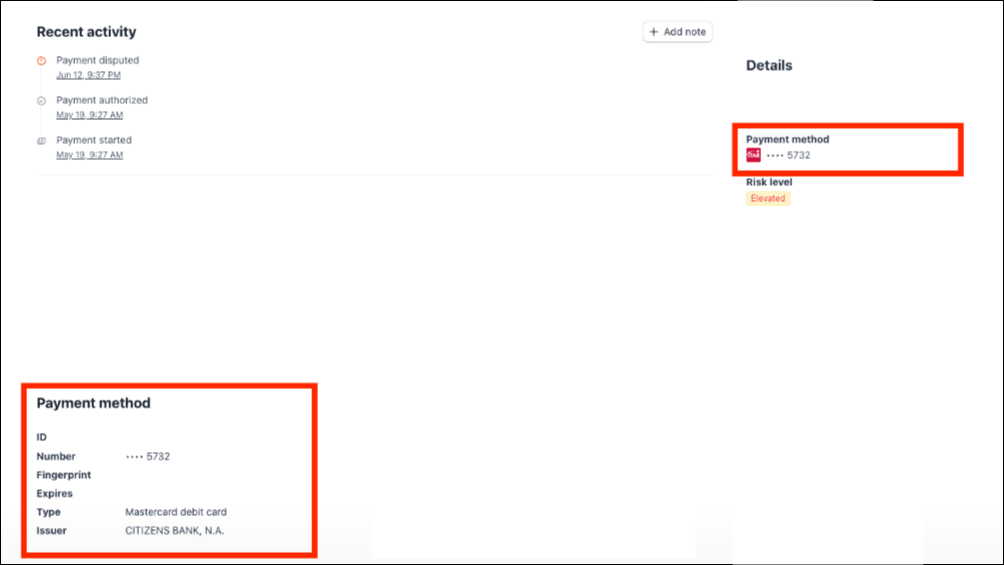
As part of its authorization optimization process, Stripe may route certain transactions through alternative debit networks, such as STAR, NYCE, Pulse, Accel, Shazam, and Maestro, to increase the likelihood of authorization approval. Since dispute alert programs such as Ethoca and RDR rely on supported card networks, transactions routed through alternative networks may not be eligible, which can result in reduced dispute alert coverage.
What Merchants Should Know
- SAA is designed to improve authorization rates and recover legitimate sales that might otherwise be declined
- Stripe may automatically enable this feature for eligible merchants
- A transaction's eligibility for dispute alert programs depends on the payment network used to process it
If You Notice Missing Dispute Alerts
- Confirm that your billing descriptor and BIN-CAID mapping are active and correctly configured
- Review the transaction's processing history to determine whether it was routed through an alternative payment network
- If alert coverage is a priority, consider contacting Stripe Support to discuss disabling Adaptive Acceptance or adjusting your payment optimization settings
Tags
Was this article helpful?
Help us improve our documentation